
GUIDELet’s get started
with RAKUZA!
GUIDE01Before getting started
You’ll encounter a lot of technical terms on RAKUZA, beginning with NFT.
We will now introduce RAKUZA, while explaining some of these terms in a way that is easy to understand for all.
In doing this, RAKUZA aims to protect and raise the value of the world's beloved cultures using blockchain technology.
Now widely recognized as valuable cultural properties in their own right, these famous scenes and memorable moments from Japanese anime can be yours alone to own through the RAKUZA platform. Experience firsthand the history, techniques, and passion behind the spirit of Japanese craftsmanship.
RAKUZA promises to continue protecting this globally-recognized culture born from Japan’s tradition of craftsmanship well into the future.
Blockchain
Blockchain is a technology that allows for recording and managing data. It is also known as “distributed ledger technology.” Information concerning monetary transactions that are recorded on this ledger is shared, stored, and managed by all participants trading in a given cryptocurrency. Blockchain technology clearly shows who recorded what type of information in the ledger and when so that this information can be shared, stored, and managed without the risk of being falsified or fabricated.
Token
Like crypto assets such as Ethereum (ETH) and Bitcoin, tokens are a virtual currency whose price fluctuates depending on the supply and demand relative to the distribution volume. On the other hand, a token is a virtual currency that does not have its own blockchain and instead uses the Ethereum blockchain. The difference between the two is that Ethereum (ETH) is generally recognized as a "currency" due to its characteristics, whereas tokens are said to be closer to the image of "stocks".
Defi
Defi stands for "Decentralized Finance." Since all transactions are carried out on the blockchain, it is possible to manage financial assets more transparently and autonomously without requiring an administrator to execute and record transactions. A typical example of DeFi is an "DEX (Decentralized EXchange)", which securely supports direct transactions between users instead of requiring them to deposit assets on the exchange.
NFT
NFT stands for "Non-Fungible Token," which means that a token is not interchangeable or substitutable. Inherently, digital data is free and easy to copy, but by using blockchain technology, it is possible to create unique data, display its ownership, and transform it into a valuable asset. NFTs allow for this.
GUIDE02What you need
You will need the following three items in order to start using RAKUZA.
For details on how to prepare for using RAKUZA, please see “Steps to starting RAKUZA.”

A Wallet
Wallet to purchase and hold NFTsWe recommend MetaMask.

Ethereum (ETH)
Crypto assets to purchase NFTsExamples of exchanges for acquiring Ethereum:
bitflyer, coincheck, BINANCE, etc.
How RAKUZA works
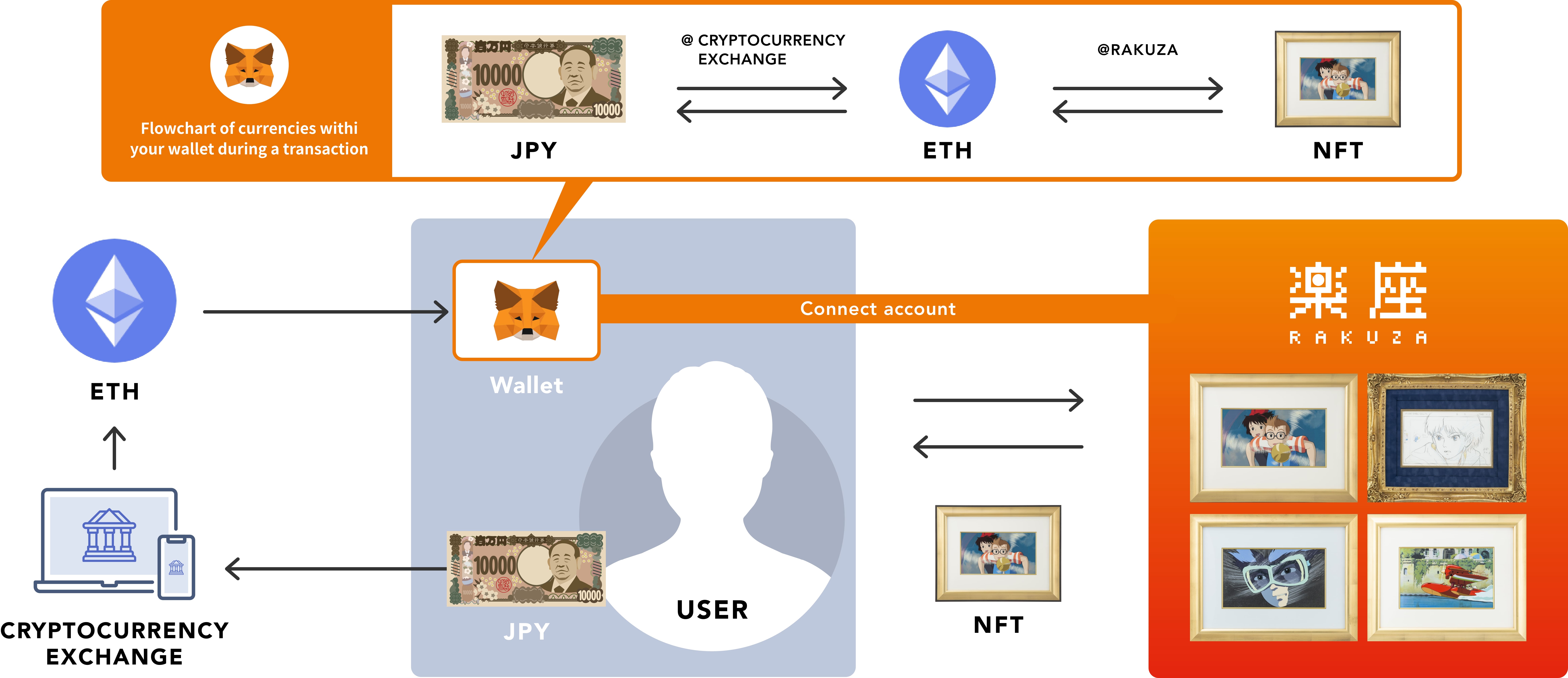
GUIDE03Steps to starting RAKUZA
We will now explain the steps you will need to follow in order to prepare the items you will need and begin using RAKUZA.
Purchase Ethereum
In order to shop on RAKUZA, you will need to first exchange some Japanese yen for Ethereum. After setting up an account on your exchange or shop of choice, please purchase some Ethereum.
Registering an account at an exchange or shop
First, register and open an account at an exchange or shop that allows for purchasing Ethereum using Japanese yen.*For details on how to set up an account please refer to the guides available at your selected exchange or shop.

Purchase Ethereum with Japanese yen
Now, you can purchase some Ethereum in exchange for Japanese yen.*Gas fees, which are required for completing a transaction on RAKUZA, will also be paid in Ethereum (ETH).

Set up your wallet
When purchasing, holding, or reselling NFTs on RAKUZA, you will need a compatible wallet. Create a wallet and transfer ETH from the exchange or resale where you purchased Ethereum (ETH) to the wallet you created.
Creating a wallet
Create your wallet by registering your account information on MetaMask.
Recommended wallet
MetaMask

Send your Ethereum (ETH) to your wallet.
Send the Ethereum (ETH) you have purchased from the exchange or shop to your MetaMask wallet by assigning your wallet’s address.*If you enter the incorrect MetaMask wallet address when sending your Ethereum (ETH), there is a high chance your Ethereum (ETH) will be lost. Please copy and paste your wallet address and make sure it is correct before sending your Ethereum (ETH).

Connect your wallet to RAKUZA
After accessing the RAKUZA platform, click on “connect wallet” in the top right corner of the screen. After selecting MetaMask, your wallet will be connected.
When connecting your wallet via your smartphone1. Launch the MetaMask app.
2. Select the "browser" menu.
3. In the search box enter "https://rakuza.io/" to access the site.
4. Click on “connect wallet” in the top right corner.

Purchase an item
Access the page for the item being handled at RAKUZA and click the "Buy Now" button. Enter the "Gas Price (GWEI)" and "Gas Limit" and press the "Confirm" button.
When you see the message "Transaction successfully completed," your purchase is complete.
Notes*When purchasing an item, you will be charged for both the item price and the required gas fees to complete the transaction.
*In general, it may take around 3 to 5 minutes to complete a transaction.
Please be aware that if someone has attempted to purchase an item at the same time as yourself, priority will be given to whichever transaction is completed first.

Confirm the item purchased
While logged in, click on the user icon in the top right corner of the screen. Select “my page” from the pulldown menu to view a list of the assets you have purchased.
To confirm the items you have purchased on your wallet (MetaMask)
1. Select the "wallet" menu
2. Select the "collectibles" tab
3. Select "add collectible"
4. Enter your address and ID
5. The item you have purchased with your "NFTTOKEN" will then be added
6. Select the item you have purchased to confirm its details
NotesConcerning the "address" and "ID" mentioned in [4], you can check these from your RAKUZA my page under "purchased assets" by accessing the details for the item you wish to view within your wallet and confirming the "contact address" and "token ID."
